
You walk into a meeting room, a church auditorium, or a retail store. The LED screen looks superb from the doorway. Take three steps closer and the image dissolves into a grid of dots.
That is a pixel pitch problem, and it cannot be fixed after installation. Too coarse and the screen looks blocky from where people actually stand. Too fine and you have paid for pixels nobody will ever resolve — often 40% more than the project needed.
Choosing correctly takes two calculations and one sanity check. No specialist software, no supplier required. Work through it before you request quotes and you will negotiate from a much stronger position.
Step 1: Work out how big the screen needs to be
Screen size comes before pitch, and it is driven entirely by viewing distance — the gap between the average viewer and the display.
The human field of view sets the limit. A screen that is too small for the room reads like a television in a stadium. Too large and viewers have to move their heads to take in the whole image. AVIXA display standards and THX cinema guidance converge on roughly a 36-degree horizontal viewing angle as the comfortable target.
The geometry is straightforward, as shown in the figure below: stand D metres back from the screen. Your eyes comfortably take in about 36° of horizontal view — 18° to the left of centre and 18° to the right. The perpendicular distance from you to the screen, combined with that 36° fan, is what determines the screen width.
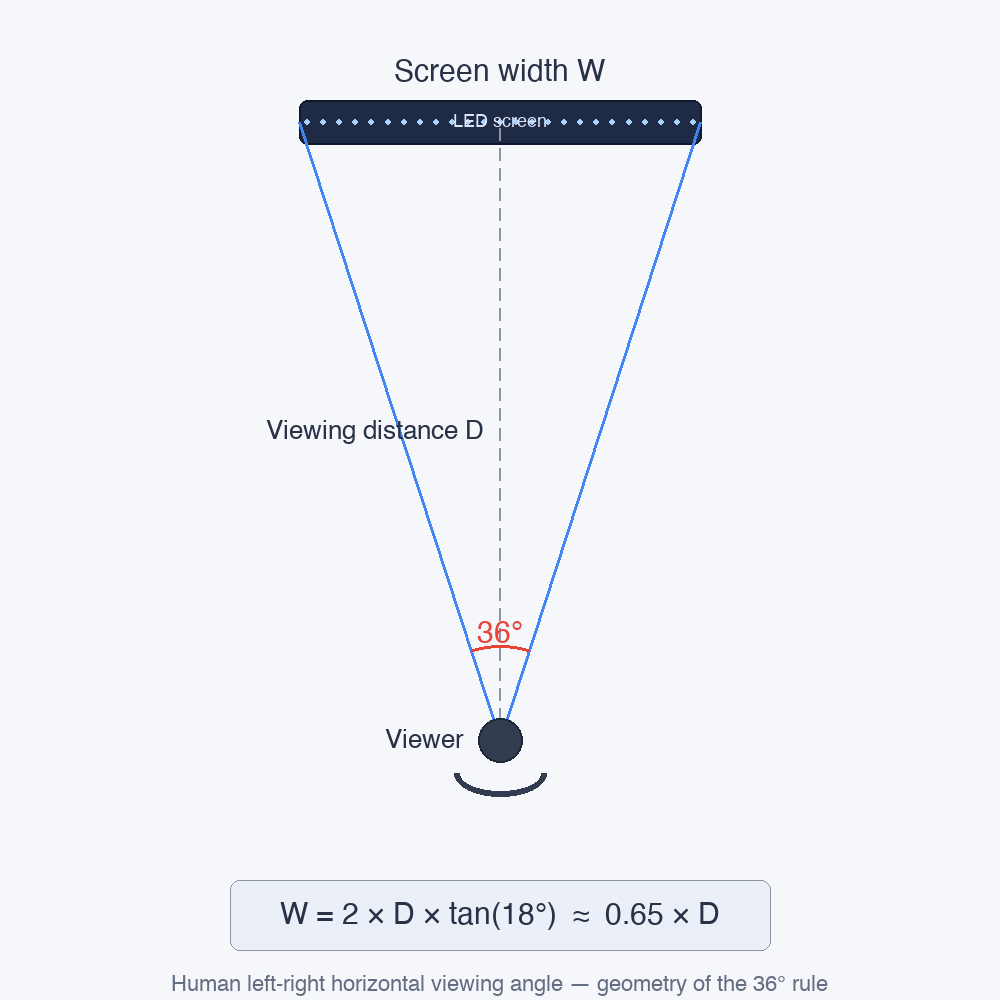
Translated into something you can use on site:
Screen width ≈ 0.65 × viewing distance
Viewers seated 6 metres back need a screen about 3.9 m wide, which on a 16:9 aspect ratio is roughly a 4.5 m diagonal — around 177 inches. That is it. One multiplication.
| Viewing distance | Screen width | Diagonal (16:9) |
|---|---|---|
| 3 m / 10 ft | 1.95 m / 6.4 ft | ~88 in |
| 5 m / 16 ft | 3.25 m / 10.7 ft | ~147 in |
| 6 m / 20 ft | 3.90 m / 12.8 ft | ~177 in |
| 8 m / 26 ft | 5.20 m / 17 ft | ~236 in |
| 10 m / 33 ft | 6.50 m / 21 ft | ~295 in |
One caveat from projects we have quoted: if the wall or the ceiling height physically cannot take the calculated size, size is the constraint and everything downstream adjusts to it. Measure the available structure before you fall in love with a number.
Step 2: Convert screen size into pixel pitch
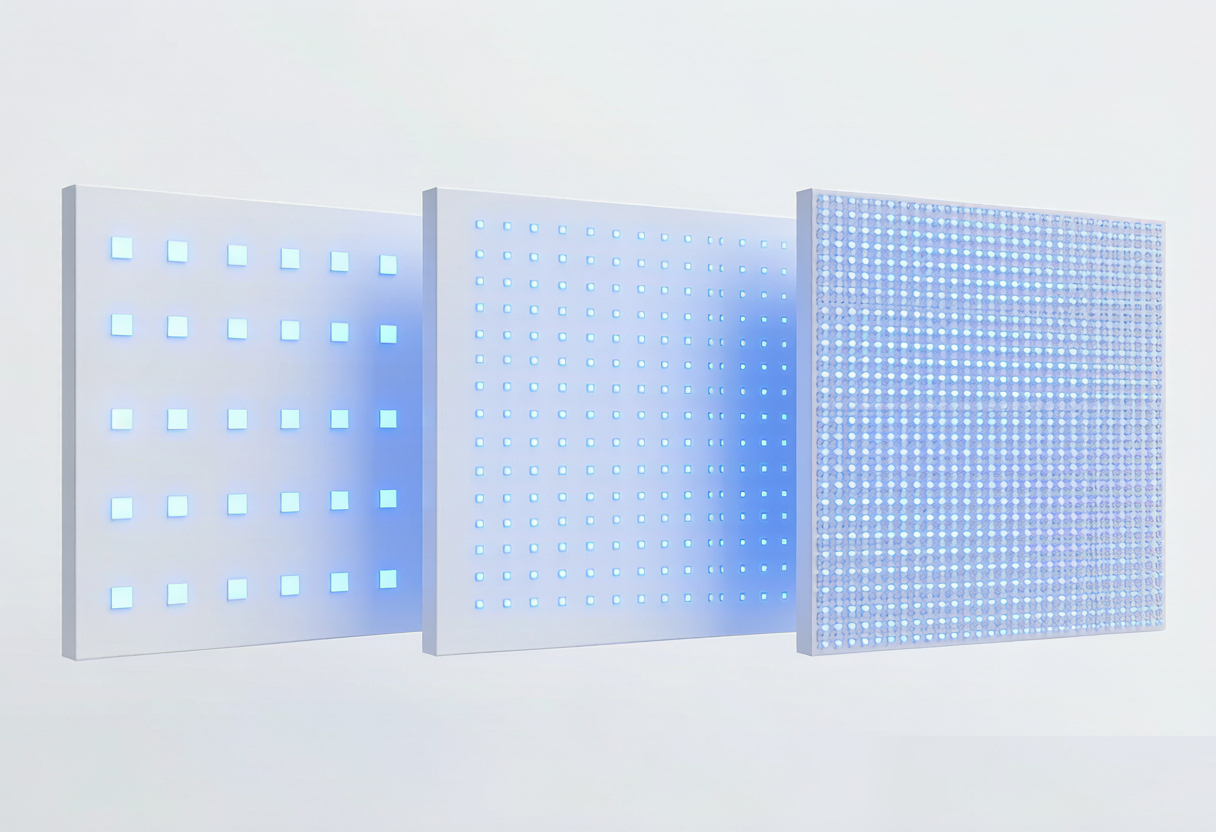
Pixel pitch is the distance in millimetres from the centre of one LED pixel to the centre of the next. P2.5 means 2.5 mm between centres. Smaller number, tighter pixels, sharper image — and a steeper price, because halving the pitch quadruples the pixel count.
As shown in the figure below, tightening the pitch packs more LEDs into the same area — the dot density goes up and the image looks cleaner at close range. The trade-off is real though: more pixels, more cost, and more heat to manage.
Commercial LED work revolves around three resolutions: 2K / Full HD (1920 × 1080), 4K / Ultra HD (3840 × 2160) and 8K (7680 × 4320). Pick your target, then divide.
Pixel pitch (mm) = screen width in mm ÷ horizontal resolution
A 3.9 m screen at 4K: 3,900 ÷ 3,840 ≈ 1.0 mm, so P1.0 hits 4K exactly. The same screen at 2K: 3,900 ÷ 1,920 ≈ 2.0 mm, so P1.9 gets you there with a little headroom.
| Screen width | 2K (1920 px) | 4K (3840 px) | 8K (7680 px) |
|---|---|---|---|
| 2.0 m | P1.0 | P0.5 | — |
| 3.3 m | P1.7 | P0.9 | — |
| 3.9 m | P2.0 | P1.0 | P0.5 |
| 5.2 m | P2.7 | P1.4 | P0.7 |
| 6.5 m | P3.4 | P1.7 | P0.85 |
These are calculated values, not catalogue items. Real products ship at P0.9, P1.2, P1.5, P1.9, P2.5, P2.6, P2.9, P3.91, P4.8, P6 and P10. To guarantee your target resolution, round down to the nearest available pitch — 1.7 mm calculated becomes P1.5, not P1.9. Rounding up gives you slightly fewer pixels than the target, which is frequently the smarter buy. The next section explains when.
The sanity check that saves the budget
Here is where most online pixel pitch advice quietly fails. Steps 1 and 2 tell you what pitch delivers a resolution. Neither tells you what the human eye can actually resolve from where people stand — and past that threshold, extra pixels are invisible. You are paying for them anyway.
A person with 20/20 vision resolves roughly one arcminute of detail, about 0.3 mm at one metre. Scale it linearly and you get three practical tiers:
| Closest regular viewer | Retina-grade (0.3 mm/m) | Premium commercial (0.6 mm/m) | Comfortable (1.0 mm/m) |
|---|---|---|---|
| 2 m | P0.6 | P1.2 | P1.9 |
| 3 m | P0.9 | P1.9 | P2.9 |
| 4 m | P1.2 | P2.5 | P3.91 |
| 6 m | P1.9 | P3.91 | P6 |
| 8 m | P2.5 | P4.8 | P8 |
| 10 m | P2.9 | P6 | P10 |
Retina-grade means individual pixels are undetectable even by someone actively looking for them. Comfortable means nobody notices the pixel structure during normal use — the standard the vast majority of commercial installations are built to, and the one behind the familiar rule of thumb that a P6 screen wants six metres of distance. Premium commercial sits between the two and is where most showrooms, lobbies and retail feature walls land.
Now combine the two methods. Take the pitch from Step 2, take the pitch from this table, and if the calculated pitch is dramatically finer than the retina-grade column, your resolution target is too ambitious for the distance. Either accept a lower resolution, or move the viewers closer, or accept that you are buying pixels for their own sake.
Our full pixel pitch selection guide breaks the distance-first approach down by application, including why you should always specify to the closest regular viewer rather than the average.
Worked example: a retail storefront screen
Customers view the screen from about 4 metres, and a handful will walk up to roughly 1.5 metres to read product detail.
Step 1 — size. 0.65 × 4 m = 2.6 m wide, giving a 3.0 m diagonal, about 118 inches.
Step 2 — pitch by resolution. 4K wants 2,600 ÷ 3,840 = 0.68 mm, so P0.6. 2K wants 2,600 ÷ 1,920 = 1.35 mm, so P1.2.
Sanity check. At 4 metres, retina-grade is P1.2 and comfortable is P3.91. A P0.6 panel at that distance is invisibly better than P1.2 while costing roughly four times as much per square metre. The 4K target is not wrong — it is simply unreachable in any way the customer can perceive.
What we would actually specify: P1.9. It clears the comfortable threshold at 4 m with room to spare, still reads cleanly for the customers who step in to 1.5 m, delivers 1,368 × 770 pixels — ample for retail video and large text — and costs a fraction of the P0.6 option. If the content were dense product specifications or live pricing tables read at close range, we would move to P1.2 and no further.
See how this plays out in specific environments on our retail LED display and shopping mall pages.
Transparent LED changes the maths
Everything above assumes a solid display. On transparent LED a third variable enters, and it moves in the opposite direction to image quality.
Transparency comes from the open area between LED strips. Tighten the pitch and the strips crowd together, so see-through drops. You are no longer balancing two factors but three: viewing distance, content detail, and how much glass has to stay glass.
| Pitch | Transparency | What it suits |
|---|---|---|
| P2.6 | ~65% | Sharpest image; glass reads as noticeably tinted |
| P3.91 | ~75% | Best all-round balance for storefronts |
| P6 | ~82% | Glass still reads as glass |
| P10 | ~90% | Nearly invisible when powered off |
| P16 | ~95% | Effectively clear glass, very coarse image |
In practice one of the three has to give. Storefront glazing where the shop interior must stay visible usually lands on P3.91; a facade seen from across a plaza can go to P10 and keep the building looking like a building. Decide which factor you are sacrificing deliberately, rather than discovering it after installation.
When the seam matters more than the pitch
Below about two metres of viewing distance the limiting factor stops being pitch altogether and becomes the joint between panels. A correctly specified P1.2 wall still shows a visible grid under flat colour if the cabinets meet mechanically — and no amount of extra resolution hides it.
This is the specific problem TFT glass-based Micro LED solves: chips bonded directly onto a glass substrate bring module gaps down to around 20 microns, roughly thirty times below what the eye resolves at two metres. If your screen is a reception desk, a control room or a handover bay, check the seam specification before you compare pitch numbers.
Checklist before you request quotes
- Measure the distance to the closest regular viewer, not the average
- Multiply by 0.65 for target screen width — then confirm the structure can carry it
- Decide whether the content genuinely needs 2K, 4K or 8K
- Divide width in mm by horizontal resolution to get the calculated pitch
- Cross-check against the acuity table; if the calculated pitch is far finer than retina-grade, step back
- On transparent products, confirm the transparency that pitch delivers
- Under 2 m viewing distance, ask about module seams as well as pitch
- Add 10–20% budget for controller, cabling, structure and commissioning
Frequently asked questions
Should I just buy the finest pixel pitch I can afford?
No. Beyond roughly 0.3 mm per metre of viewing distance the extra pixels are physically undetectable. At 10 metres a P0.9 screen and a P2.9 screen look identical, and the P0.9 costs several times more. Spend the difference on brightness, a better controller or a proper service contract instead.
What if viewers stand at very different distances?
Specify for the closest position where people actually stop and look. Someone walking past a facade at two metres is not evaluating image quality. Someone seated in the front row for an hour is. Viewers further back always see a sharp image; viewers closer than the specification never do.
Does the type of content change the answer?
Significantly. Small text, dashboards, spreadsheets and fine graphics push you toward the retina-grade column. Large video backgrounds, brand imagery and headline text sit comfortably at the coarse end. Two identical rooms with different content can justify a three-fold difference in pitch.
Is 4K always better than 2K on an LED wall?
Only if the source content is genuinely 4K and viewers are close enough to resolve it. On a 3 m wide screen viewed from 5 metres, 4K is invisible against 2K. It also multiplies the load on the processor and the cabling, so it costs more than the panels alone suggest.
Why do two suppliers recommend different pitches for the same room?
Usually because one is specifying to viewing distance and the other to a resolution target, without reconciling the two. Ask both for the closest viewing distance they assumed and the horizontal pixel count their proposal delivers. The gap between the answers explains the gap between the prices.
Does pixel pitch affect brightness or lifespan?
Not directly, but they correlate. Fine-pitch indoor products typically run 600–1,200 nits, while coarse outdoor pitches reach 5,000–10,000 nits. If the screen faces daylight, brightness may constrain your pitch options before viewing distance does. More detail in our transparent LED FAQ.
Getting it right the first time
Start with the distance, size the screen at 36 degrees, divide to get the pitch, then check it against what the eye can actually resolve. Three sums and one reality check keep you out of the two expensive failure modes: a screen that looks like a dot matrix, and a screen that cost twice what the room needed.
Send us the screen size, the distance to the closest regular viewer and a description of the content, and we will specify the pitch and tell you why — including the cases where a coarser, cheaper pitch is the right answer. Request a specification or browse the full display range.
Explore related solutions: Locked in your pixel pitch? Apply it to our transparent LED display solutions or the pixel pitch guide.